
Running an AI companion locally on your hardware is the ultimate way to guarantee absolute data privacy, eliminate monthly subscription fees, and bypass corporate censorship filters. However, local deployment often hits a massive physical bottleneck: your graphics card’s Video RAM (VRAM).
If you are running a standard mid-range desktop or laptop with an 8GB VRAM setup (such as an NVIDIA RTX 3070 or 4060), trying to load massive models will lead to “system RAM spilling,” causing your chat speeds to drop to a painfully slow crawl.
To get smooth performance, you need to use local AI companion GGUF models compressed via quantization. Specifically, 4-bit quantization (Q4_K_M) serves as the current sweet spot—offering near-full intelligence while shrinking file sizes down to fit entirely inside your GPU memory.
Here are the absolute best GGUF models optimized for deep, conversational roleplay on 8GB VRAM setups.
1. Qwen3.5 9B (Q4_K_M): The Intelligent Memory King
If you only download a single model for your local companion setup, make it Qwen3.5 9B. In rigorous hardware benchmarks, this model has become the absolute default recommendation for 8GB cards due to its incredible efficiency.
- Why it excels for companions: While Qwen is built as a generalist model, its sheer structural logic makes it a world-class roleplayer. It easily tracks complex conversational plots over massive, expanded context windows. This means it won’t forget subtle details or relationship traits you mentioned thousands of words ago.
- 8GB Footprint: At roughly 6.6GB on disk in its Q4_K_M format, it leaves just enough VRAM headroom to handle a robust active chat history without crashing your system.
2. Llama 3.1 8B Fine-Tunes (Stheno / Lumimaid GGUF): Best Creative Prose
If you prioritize vivid storytelling, unique dialogue flavor, and organic emotional back-and-forth over factual logic, look straight toward specialized community fine-tunes of Meta’s Llama 3.1 8B architecture—specifically Stheno or Lumimaid.
- Why it excels for companions: These models are post-trained explicitly on thousands of high-quality fiction writing prompts and roleplay data blocks. They swap out clinical, robotic responses for rich, natural dialogue filled with environmental descriptions and complex character subtext.
- 8GB Footprint: A Q4_K_M version fits comfortably into 6GB of VRAM, giving you plenty of leftover allocation to run a 16K context window smoothly at blazing-fast token speeds.
3. Undi95 DPO Mistral 7B: The Uncensored Specialist
For users who want zero guardrails or safety blocks during intense narrative scenarios, Undi95 DPO Mistral 7B remains a dominant, lightweight champion.
- Why it excels for companions: It is fine-tuned via Direct Preference Optimization (DPO) to be entirely uncensored and emotionally consistent. It will never shy away from mature themes, dark narrative twists, or aggressive banter, nor will it break immersion with a rigid “I cannot fulfill this request” message.
- 8GB Footprint: Because it is a 7B model, it is incredibly snappy. You can easily push it to higher quantization levels (like Q5_K_M) or run massive context lengths without breaking a sweat on budget hardware.
4. MN Violet Lotus 12B (Q4_K_M): Pushing the Absolute Limit
If you want to push right up against the absolute ceiling of your 8GB card, look for MN Violet Lotus 12B (or similar Nemo 12B community splits).
- Why it excels for companions: Violet Lotus is a sophisticated merge designed explicitly for extreme emotional intelligence (EQ). It reads between the lines of your text, capturing subtle mood shifts and psychological nuances better than smaller 7B models.
- 8GB Footprint: This is a tight fit. Running a 12B model at Q4_K_M uses nearly your entire VRAM buffer. You will need to offload a few model layers to your CPU using a launcher like KoboldCPP if your chat log grows incredibly long, resulting in a slight drop in generation speed for much deeper quality.
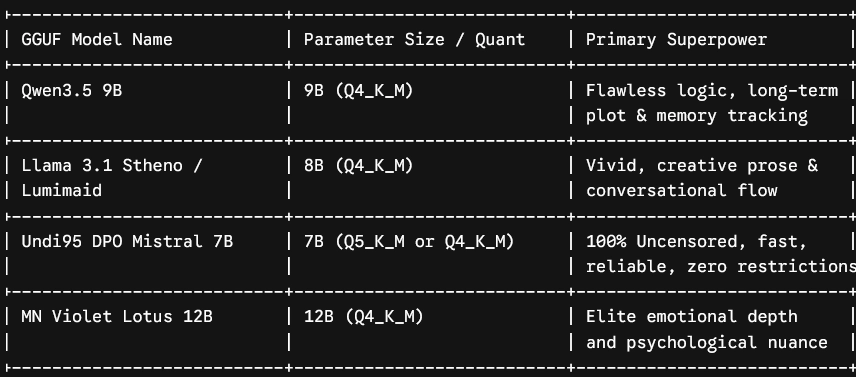
Summary of Core Optimization Settings
To keep your chosen local AI companion GGUF models running efficiently on your 8GB card within frontends like SillyTavern or LM Studio, apply these essential guardrails:
- Stick to Q4_K_M or IQ Quants: Avoid downloading uncompressed Q8 or FP16 models; they will instantly overflow your card.
- Cap Your Context Window: Keep your active memory restricted to 8K or 16K tokens early on. High context demands massive VRAM allocations.
- Turn on Flash Attention: Enabling this flag in your backend loader dramatically reduces memory overhead, maximizing your generations per second.