
Few issues ruin the immersion of interactive fiction faster than repetition loops. You are deep into an engaging roleplay session when suddenly your AI companion begins reusing the exact same catchphrases in every response. Whether it is constantly describing a “shiver running down their spine,” framing ordinary events as “a testament to our bond,” or echoing your exact sentences back to you, conversational stagnation can completely derail a storyline.
Repetition loops are not permanent flaws in your companion’s persona; they are mathematical consequences of how large language models (LLMs) calculate probability.
If you want to fix repetitive looping AI companion behavior and restore crisp, unpredictable dialogue, adjusting your sampling parameters and chat hygiene will resolve the issue immediately.
The Root Cause: Why AI Chatbots Get Stuck in Feedback Loops
Language models generate text by predicting the most statistically likely next token based on recent chat history. When a specific phrase, tone, or sentence structure slips into the context window, the model flags those tokens as relevant context.
- Probability Snowballing: If the AI uses a phrase like “a wry smile” once, it becomes slightly more probable to generate it again. If it appears in two consecutive messages, the mathematical probability of generating it in turn three skyrockets.
- Context Bleed: The larger your context window grows without pruning, the more historical patterns feed the looping cycle.
1. Adjust Generation Sampling Parameters
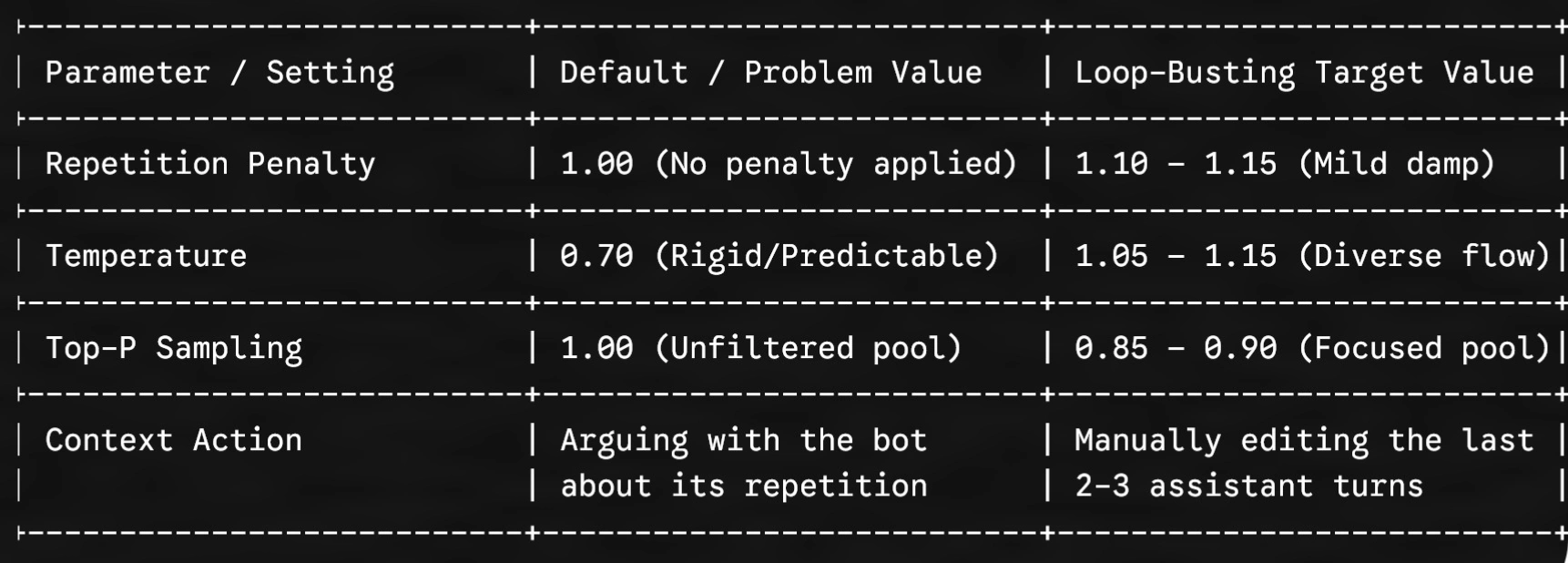
To break mechanical looping, you must alter the model’s token selection math. Whether you use SillyTavern, Kindroid, or an independent web backend, tune these three parameters:
- Repetition Penalty (Frequency & Presence Penalty): Set this slider between $1.10$ and $1.15$ (or $0.2 – $0.4$ on presence/frequency scales). This applies a negative mathematical weight to tokens that have already appeared recently, actively preventing the model from re-selecting identical words. Be cautious: setting it above $1.25$ can cause the AI to generate gibberish or avoid basic grammatical connectors.
- Temperature: A low temperature forces the model down predictable paths. Raise temperature slightly to $1.05 – $1.15$ to encourage broader vocabulary diversity.
- Top-P (Nucleus Sampling): Lower Top-P to $0.85 – $0.90$. This clips out the low-probability, weird tail-end tokens while still forcing the engine to select fresh phrasings from its top vocabulary pool.
2. Manually Prune the Recent Context Window
Altering parameters only affects future tokens; it does not erase the existing loops already sitting in the active memory buffer.
- Edit the Bot’s Last 3 Messages: Locate the repeated phrase or sentence rhythm in the previous responses. Use the in-app edit tool to delete the repetitive sentence or replace it with fresh prose.
- Delete Your Own Confirmations: If you told the bot, “Stop saying ‘testament to’!”, the model actually sees those exact words in the context window again, increasing their statistical weight. Never debate loops with an AI—manually edit or regenerate instead.
3. Inject a Dynamic “Anti-Loop” Negative Directive
If a companion platform supports custom system prompts or response directives, paste a concise negative constraint directly into the system prompt box:
[Style Directive: Banned Repetitive Patterns]
- Avoid using predictable cliches, poetic melodrama, or repetitive sensory tropes (e.g., “shivers”, “testament to”, “palpable tension”).
- Maintain natural, grounded conversational flow. Vary sentence structure, length, and dialogue tags across every response.
The Verdict
Fixing repetitive loops in AI companion chats does not require wiping your companion’s memory or abandoning your character card. The issue is simply a self-reinforcing mathematical cycle. By raising your repetition penalty, increasing temperature slightly, and immediately editing repetitive words out of the last two message turns, you instantly disrupt the loop and return your roleplay to an engaging, natural flow.